


Optimized battery charging is a smart feature that uses machine learning to reduce battery wear by pausing charging at 80% and completing the charge just before you typically unplug your device—extending your battery’s lifespan significantly.
Quick Answer:
Every rechargeable battery in your phone, tablet, or backup power system is a consumable component. Lithium-ion batteries degrade with every charge cycle, influenced by temperature, voltage stress, and how long they spend at 100% charge.
Modern smartphones have gotten smarter about this. Instead of racing to 100% and sitting there for hours while you sleep, they now learn your habits. The phone charges to 80%, pauses, and then finishes the final 20% just before you wake up.
This isn’t just clever—it’s essential. The time your battery spends fully charged accelerates its chemical aging. By reducing that exposure, optimized charging can add months or even years to your battery’s useful life. For anyone who relies on backup power systems, understanding battery optimization isn’t just about phones. These same principles apply to the batteries in generator systems, ensuring they’re ready when you need them most.
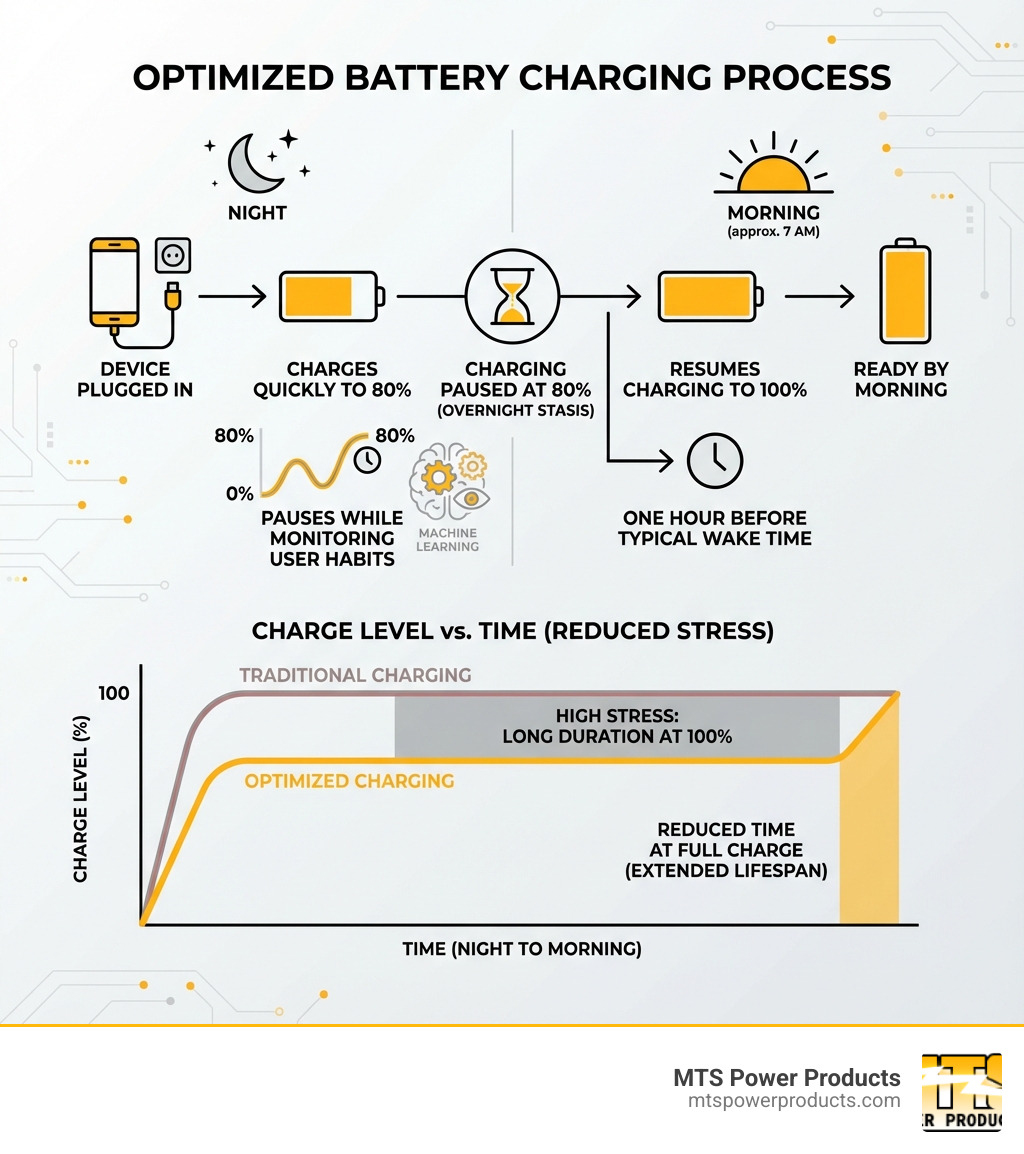
At its core, Optimized battery charging is a software feature designed to extend the lifespan of your device’s battery. Instead of pushing power into your battery until it hits 100% and holding it there, this technology minimizes the time your battery spends at a full charge—a state that accelerates its natural degradation.
This feature uses on-device machine learning to understand your daily charging routines. For example, if you consistently charge your phone overnight, the system learns your typical wake-up time. It will quickly charge your device to 80%, then pause. The remaining 20% is added just before it predicts you’ll unplug, ensuring you wake up to a full battery without it being stressed at 100% for hours. The goal is to reduce battery wear and maintain performance over time. You can learn more about this feature from Apple’s support pages: About Charge Limit and Optimized Battery Charging on iPhone.
To appreciate optimized battery charging, it helps to understand lithium-ion batteries. These are “consumable components,” meaning they naturally degrade over time. Their lifespan is determined by their “chemical age,” which is affected by temperature and charging patterns.
One of the biggest enemies of a lithium-ion battery is prolonged time at 100% charge, which causes “voltage stress.” This stress on the battery’s internal components accelerates chemical aging, reducing its capacity and peak performance. As the battery ages, it holds less charge and may struggle to deliver power for demanding tasks. For a deeper understanding, check out this guide on How to Prolong Lithium-based Batteries.
Apple introduced Optimized battery charging with iOS 13. For the feature to work, your iPhone uses on-device machine learning to learn your daily charging habits, which can take a couple of weeks. It requires consistent charging patterns, typically activating in locations where you spend the most time, like home or work. This location data is processed on your device for privacy.
When charging is paused at 80%, a notification appears on the Lock Screen showing when it will resume. If you need a full charge sooner, you can touch and hold the notification and tap “Charge Now” to override the feature. This provides a balance between battery protection and user convenience. For more tips, Apple provides excellent resources: maximize battery performance and lifespan.
Like any smart feature, optimized battery charging comes with its own set of advantages and potential inconveniences. For most users, the benefits far outweigh any minor drawbacks.
The primary goal of optimized battery charging is to extend the overall lifespan of your battery. Here’s a look at the advantages:
While the benefits are clear, optimized battery charging isn’t a one-size-fits-all solution.
The main “drawback” is often related to inconsistent charging schedules. If your routine is unpredictable, the machine learning might struggle to predict when you’ll unplug, potentially leaving your phone at 80% when you need to go.
Consider these situations where you might want to temporarily disable the feature:
The good news is that disabling or enabling this feature is quick and easy, allowing you to adapt to your current needs.
Taking control of your battery’s health is simpler than you might think. Here’s how to manage optimized battery charging and implement other smart habits.
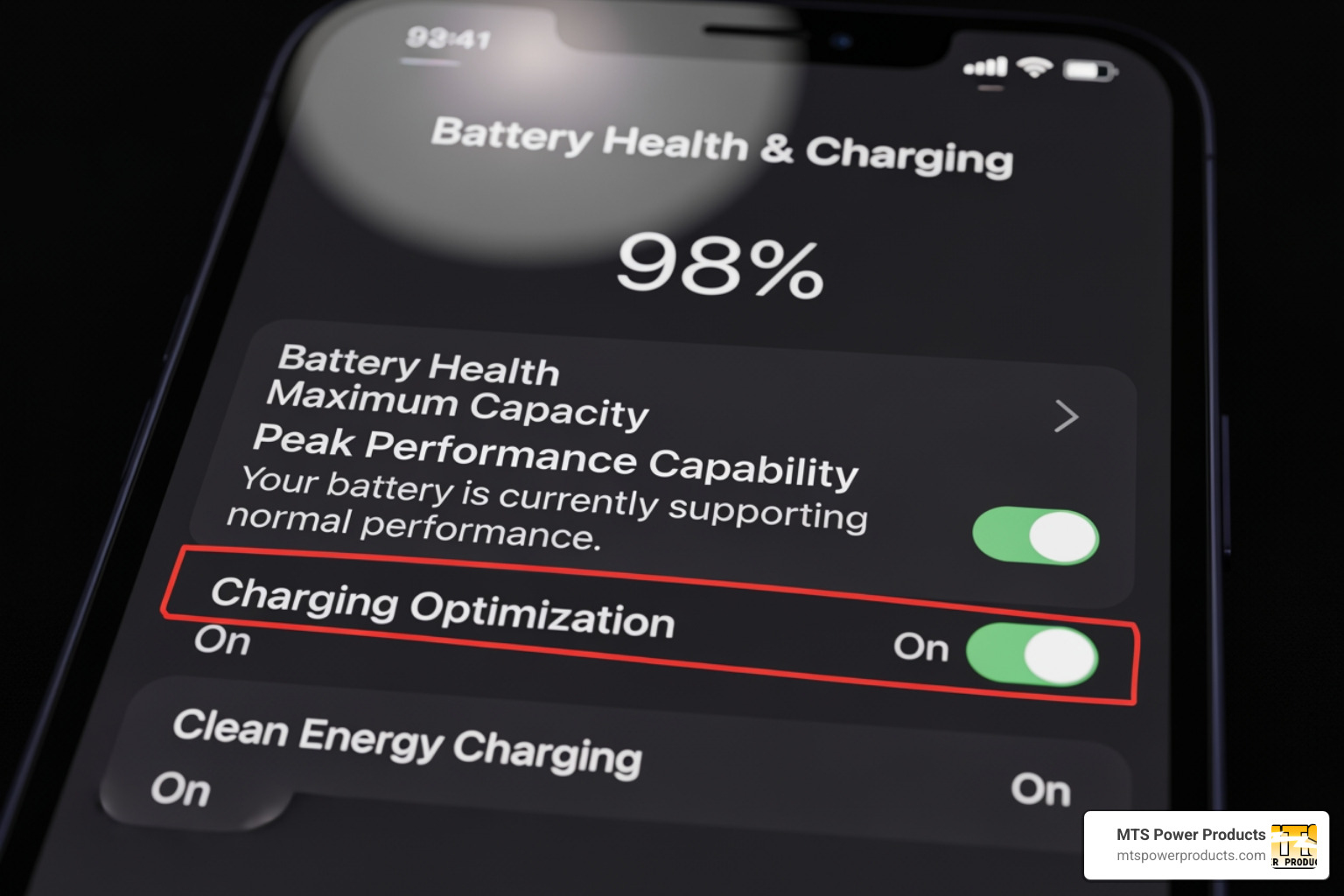
Managing optimized battery charging on your iPhone is straightforward.
From here, the steps vary slightly by model:
We recommend keeping optimized battery charging enabled for most users to extend battery longevity.
Temperature is a huge factor in the chemical aging of lithium-ion batteries. Heat is the biggest threat to your battery’s lifespan. The ideal operating zone is between 16° to 22° C (62° to 72° F), but it’s crucial to keep your phone between 0° to 35° C (32° to 95° F). Anything hotter accelerates battery aging.
Here are some practical steps to keep your phone’s battery cool:
Beyond optimized battery charging and temperature management, other habits can help.
While Apple’s iPhone is often highlighted for its optimized battery charging feature, this intelligent approach to battery health is not exclusive to one ecosystem. Many modern devices have adopted similar strategies to prolong battery lifespan.
Android manufacturers have developed their own versions of optimized battery charging, often under different names but with similar principles.
Here’s a quick comparison:
| Feature Name | Device Ecosystem | How it Works |
|---|---|---|
| Optimized Battery Charging | Apple iPhone | Learns your routine, pauses at 80%, and finishes charging just before you unplug. |
| Adaptive Charging | Google Pixel | Times the charge to reach 100% just before your morning alarm. |
| Protect Battery | Samsung Galaxy | Sets a hard limit, stopping the charge at 85% to reduce stress. |
With the iPhone 15, Apple introduced a dedicated “80% Limit” option alongside the traditional Optimized battery charging. What’s the difference?
When an 80% limit might be better:
It’s worth noting that even with an 80% limit, your iPhone may occasionally charge to 100% to calibrate the battery’s state-of-charge estimates and keep the percentage accurate. The choice depends on whether you prefer the convenience of a managed 100% charge or the maximum protection of a lower charge limit.
Here are answers to some of the most common questions about optimized battery charging.
Yes, absolutely. This feature is designed to reduce battery wear by minimizing the time your device spends at 100% charge. This extends the battery’s overall lifespan and helps maintain its performance over time. For most users, the long-term benefits are significant.
No, optimized battery charging does not drain the battery. It simply pauses the charging process at 80% and resumes later. It doesn’t consume power; it manages the power going into the battery to protect it.
The difference is their goal.
We’ve explored how optimized battery charging works, from the science of lithium-ion batteries to the smart features on iPhones and Android devices. It’s clear that this technology is essential for extending the life of our electronics.
By enabling a simple setting, you can significantly reduce battery wear, slow chemical aging, and maintain your device’s performance. While there are times to prioritize a full, immediate charge, the ability to manage these settings puts you in control. The principles of smart charging—managing temperature, using certified chargers, and avoiding extreme charge levels—are key to getting the most from your devices.
Just as we at MTS Power Products provide clients in Miami, FL, with professional-grade generators and control systems built for reliability, understanding these principles empowers you to maintain your own essential equipment. It’s about efficiency, sustainability, and ensuring your tools are ready when you need them.
For advanced charging solutions for larger systems like generators, explore our range of Digital Battery Chargers. We’re here to ensure all your power needs are managed with intelligence and care.