Why Your Battery’s Future Depends on Smart Charging Today
Optimized battery charging is a smart feature that uses machine learning to reduce battery wear by pausing charging at 80% and completing the charge just before you typically unplug your device—extending your battery’s lifespan significantly.
Quick Answer:
- What it is: A feature that learns your daily charging routine and delays charging past 80% until you need it.
- How it works: Uses on-device machine learning to predict when you’ll unplug and completes charging just before that time.
- Key benefit: Reduces time spent at full charge, which minimizes chemical aging and extends battery lifespan.
- Where to find it: iPhone (iOS 13+), Google Pixel (Adaptive Charging), Samsung (Protect Battery).
- Best for: Anyone who charges overnight or has consistent charging patterns.
Every rechargeable battery in your phone, tablet, or backup power system is a consumable component. Lithium-ion batteries degrade with every charge cycle, influenced by temperature, voltage stress, and how long they spend at 100% charge.
Modern smartphones have gotten smarter about this. Instead of racing to 100% and sitting there for hours while you sleep, they now learn your habits. The phone charges to 80%, pauses, and then finishes the final 20% just before you wake up.
This isn’t just clever—it’s essential. The time your battery spends fully charged accelerates its chemical aging. By reducing that exposure, optimized charging can add months or even years to your battery’s useful life. For anyone who relies on backup power systems, understanding battery optimization isn’t just about phones. These same principles apply to the batteries in generator systems, ensuring they’re ready when you need them most.
What is Optimized Battery Charging and How Does It Work?
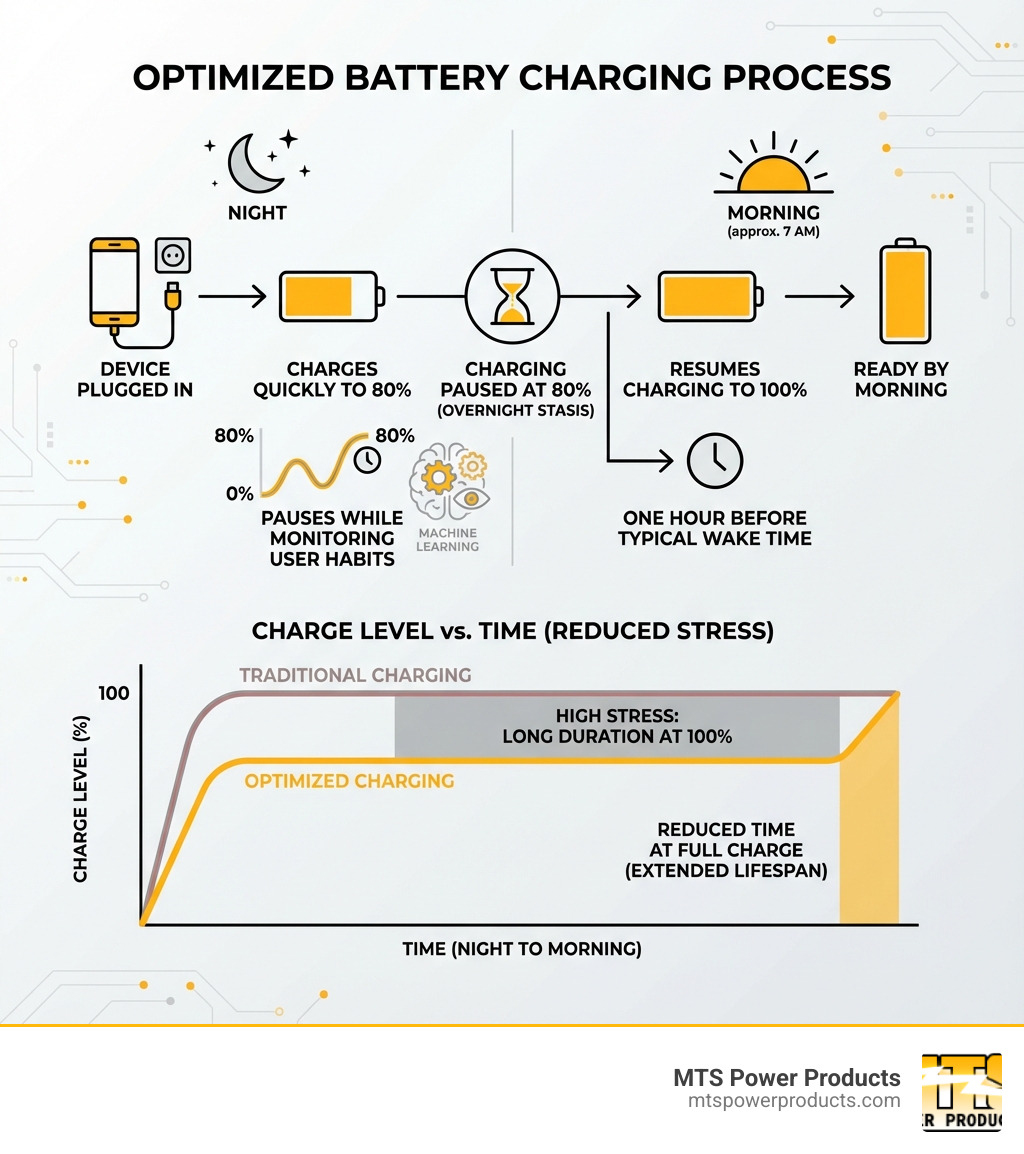
At its core, Optimized battery charging is a software feature designed to extend the lifespan of your device’s battery. Instead of pushing power into your battery until it hits 100% and holding it there, this technology minimizes the time your battery spends at a full charge—a state that accelerates its natural degradation.
This feature uses on-device machine learning to understand your daily charging routines. For example, if you consistently charge your phone overnight, the system learns your typical wake-up time. It will quickly charge your device to 80%, then pause. The remaining 20% is added just before it predicts you’ll unplug, ensuring you wake up to a full battery without it being stressed at 100% for hours. The goal is to reduce battery wear and maintain performance over time. You can learn more about this feature from Apple’s support pages: About Charge Limit and Optimized Battery Charging on iPhone.
The Science of Battery Health
To appreciate optimized battery charging, it helps to understand lithium-ion batteries. These are “consumable components,” meaning they naturally degrade over time. Their lifespan is determined by their “chemical age,” which is affected by temperature and charging patterns.
One of the biggest enemies of a lithium-ion battery is prolonged time at 100% charge, which causes “voltage stress.” This stress on the battery’s internal components accelerates chemical aging, reducing its capacity and peak performance. As the battery ages, it holds less charge and may struggle to deliver power for demanding tasks. For a deeper understanding, check out this guide on How to Prolong Lithium-based Batteries.
How It Works on an iPhone
Apple introduced Optimized battery charging with iOS 13. For the feature to work, your iPhone uses on-device machine learning to learn your daily charging habits, which can take a couple of weeks. It requires consistent charging patterns, typically activating in locations where you spend the most time, like home or work. This location data is processed on your device for privacy.
When charging is paused at 80%, a notification appears on the Lock Screen showing when it will resume. If you need a full charge sooner, you can touch and hold the notification and tap “Charge Now” to override the feature. This provides a balance between battery protection and user convenience. For more tips, Apple provides excellent resources: maximize battery performance and lifespan.
Weighing the Pros and Cons of Optimized Charging
Like any smart feature, optimized battery charging comes with its own set of advantages and potential inconveniences. For most users, the benefits far outweigh any minor drawbacks.
The Benefits of Optimized Battery Charging
The primary goal of optimized battery charging is to extend the overall lifespan of your battery. Here’s a look at the advantages:
- Extended Battery Lifespan: By reducing the time your battery spends at 100% charge, the feature significantly slows down the chemical aging process. This means your battery will maintain a higher capacity for longer.
- Reduced Chemical Aging: Prolonged high charge states stress the battery. This feature mitigates that stress, leading to less wear on the internal components of the lithium-ion battery.
- Improved Long-Term Performance: A healthier battery can better provide power for demanding tasks, helping your device maintain its snappy performance for a longer duration.
- Smarter Energy Management: This feature represents a broader shift towards intelligent energy management. Just as MTS Power Products designs advanced control panels for generators to optimize energy use, your phone’s optimized charging contributes to more efficient and sustainable device usage.
Potential Drawbacks and When to Disable Optimized Battery Charging
While the benefits are clear, optimized battery charging isn’t a one-size-fits-all solution.
The main “drawback” is often related to inconsistent charging schedules. If your routine is unpredictable, the machine learning might struggle to predict when you’ll unplug, potentially leaving your phone at 80% when you need to go.
Consider these situations where you might want to temporarily disable the feature:
- Travel: When you’re on the road, you often need your device fully charged and ready at a moment’s notice.
- Needing a Full Charge Unexpectedly: If you have an unplanned outing or an emergency, you’ll want 100% capacity immediately.
- Using Portable Power Banks: If you’re relying on a fast-charging power bank, you’re likely prioritizing speed. Having optimized battery charging enabled could mean your phone only charges to 80%, defeating the purpose of a rapid top-up.
- Fast Charging Priority: If your primary concern is always getting to 100% as quickly as possible, disabling the feature will ensure your device charges at its fastest rate until full.
The good news is that disabling or enabling this feature is quick and easy, allowing you to adapt to your current needs.
Your Step-by-Step Guide to Smart Charging
Taking control of your battery’s health is simpler than you might think. Here’s how to manage optimized battery charging and implement other smart habits.
How to Enable or Disable the Feature on iPhone
Managing optimized battery charging on your iPhone is straightforward.
- Open the Settings app.
- Scroll down and tap on Battery.
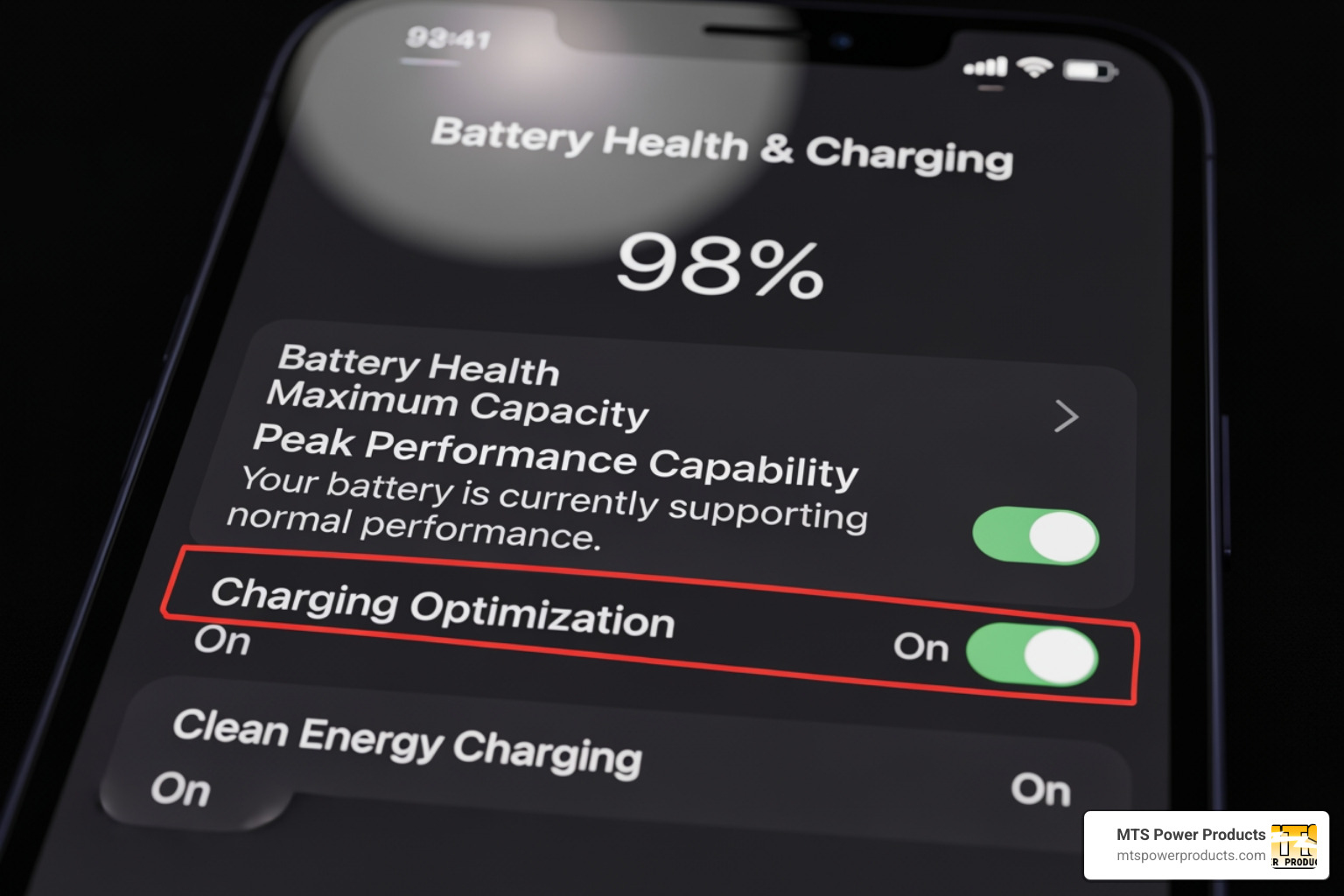
- Tap on Battery Health & Charging.
From here, the steps vary slightly by model:
- For iPhone 14 models and earlier: You will see a toggle for “Optimized Battery Charging.” Tap this to turn the feature on or off.
- For iPhone 15 models and later: Tap “Charging Optimization” to see three options:
- Optimized Battery Charging: The standard, habit-learning feature.
- 80% Limit: A hard cap that prevents charging beyond 80%.
- None: Disables all charging optimization.
We recommend keeping optimized battery charging enabled for most users to extend battery longevity.
The Critical Role of Temperature
Temperature is a huge factor in the chemical aging of lithium-ion batteries. Heat is the biggest threat to your battery’s lifespan. The ideal operating zone is between 16° to 22° C (62° to 72° F), but it’s crucial to keep your phone between 0° to 35° C (32° to 95° F). Anything hotter accelerates battery aging.
Here are some practical steps to keep your phone’s battery cool:
- Avoid Hot Environments: Never leave your phone in direct sunlight or a hot car.
- Remove Cases During Charging: Some cases trap heat. If your phone feels warm while charging, remove its case.
- Charge in a Well-Ventilated Area: Avoid charging your phone under a pillow or blanket.
- Minimize Demanding Tasks While Charging: Gaming or streaming video while plugged in generates extra heat.
More Tips for a Healthier Battery
Beyond optimized battery charging and temperature management, other habits can help.
- Avoid Extreme Charge Levels: Lithium-ion batteries don’t like being fully drained to 0% or kept at 100%. Aim to keep your battery between 20% and 80% for daily use.
- Use Certified Chargers and Cables: Uncertified accessories can deliver unstable current, stressing your battery and posing safety risks. Always use chargers from reputable manufacturers. For larger applications, we offer a range of robust Digital Battery Chargers designed for efficiency and safety.
- Keep Your Software Updated: Software updates often include battery management improvements.
- Manage Background App Refresh: Disable background refresh for apps that don’t need it to reduce battery consumption.
- Use Low Power Mode: When your battery is low, this mode temporarily reduces background activity to extend its life until you can charge.
Optimized Charging: iPhone vs. Android and Other Methods
While Apple’s iPhone is often highlighted for its optimized battery charging feature, this intelligent approach to battery health is not exclusive to one ecosystem. Many modern devices have adopted similar strategies to prolong battery lifespan.
How Optimized Charging Compares on Android Devices
Android manufacturers have developed their own versions of optimized battery charging, often under different names but with similar principles.
- Google Pixel’s Adaptive Charging: This feature works much like Apple’s system. It learns your overnight charging routine and, if you have an alarm set, ensures your phone reaches 100% just before your alarm goes off. For more details, see the Google Pixel adaptive charging guide.
- Samsung’s Protect Battery: Samsung devices offer a simpler but effective feature called “Protect Battery.” When enabled, it caps your phone’s charge at 85%, preventing the battery from ever reaching the full 100% and reducing voltage stress. Samsung provides more information on their Samsung battery protection support page.
- Other Android Devices: Many other Android manufacturers implement similar “Battery Care” or “Smart Charging” features that slow power delivery during overnight charges to reduce battery wear.
Here’s a quick comparison:
| Feature Name |
Device Ecosystem |
How it Works |
| Optimized Battery Charging |
Apple iPhone |
Learns your routine, pauses at 80%, and finishes charging just before you unplug. |
| Adaptive Charging |
Google Pixel |
Times the charge to reach 100% just before your morning alarm. |
| Protect Battery |
Samsung Galaxy |
Sets a hard limit, stopping the charge at 85% to reduce stress. |
Optimized Charging vs. an 80% Charge Limit
With the iPhone 15, Apple introduced a dedicated “80% Limit” option alongside the traditional Optimized battery charging. What’s the difference?
- Optimized Battery Charging (Dynamic): This feature is adaptive. It learns your habits to give you a full 100% charge right when you need it, while still protecting the battery overnight.
- 80% Limit (Static): This option sets a hard cap at 80%. Your phone will stop charging at 80% and stay there.
When an 80% limit might be better:
- Maximum Longevity: If extending battery life is your top priority and you rarely need a full charge, a static 80% limit offers the most protection.
- Predictable Needs: If 80% is always enough for your day, this option is simple and effective.
It’s worth noting that even with an 80% limit, your iPhone may occasionally charge to 100% to calibrate the battery’s state-of-charge estimates and keep the percentage accurate. The choice depends on whether you prefer the convenience of a managed 100% charge or the maximum protection of a lower charge limit.
Weighing the Pros and Cons of Optimized Charging
Like any smart technology, optimized battery charging offers compelling advantages but also has scenarios where it might not perfectly align with a user’s immediate needs. Understanding both sides helps you make informed decisions about managing your device’s power.
The Benefits of Optimized Battery Charging
The core purpose of optimized battery charging is to safeguard the long-term health of your device’s battery, extending its life and maintaining performance.
- Extended Battery Lifespan: By reducing the time your battery spends at 100% charge, the feature slows the chemical aging process. This means your battery retains a higher capacity for longer, delaying the need for a replacement.
- Reduced Chemical Aging: High charge states create stress within the battery. Optimized battery charging minimizes this stress, leading to less wear on the internal components of the lithium-ion cells and slower capacity degradation.
- Improved Long-Term Performance: A healthier battery can better deliver power for demanding tasks, helping your device maintain its original snappy performance for a longer duration.
- Smarter Energy Management: This feature represents a more intelligent approach to power management. Just as we at MTS Power Products design advanced control systems for generators to optimize energy use and ensure reliability, your phone’s optimized charging contributes to more efficient and sustainable device usage.
Potential Drawbacks and When to Disable Optimized Battery Charging
While beneficial for longevity, optimized battery charging can be inconvenient in certain situations.
The most common “drawback” comes from inconsistent charging schedules. If your routine is unpredictable, the algorithm may fail to have your phone fully charged when you need it. This could leave you with an 80% charge when you’re about to head out.
Consider disabling the feature in these situations:
- Travel and Unpredictable Schedules: When on the go, having your phone at 100% is often a priority.
- Urgent Need for Full Charge: In an emergency or for an unexpected event, you’ll want to charge to 100% immediately.
- Using Portable Power Solutions: When using external power sources like portable power stations or fast-charging power banks, you’re likely prioritizing a quick, full charge. The optimization feature might delay this.
- Prioritizing Fast Charging: If your goal is always to get to 100% as quickly as possible, disabling the feature will ensure the fastest charging rate.
The flexibility to toggle optimized battery charging allows you to balance long-term battery health with immediate power needs.
Your Step-by-Step Guide to Smart Charging
Taking charge of your battery’s health is a proactive step that can significantly extend the life of your devices. Here’s how to manage optimized battery charging and other key settings.
How to Enable or Disable the Feature on iPhone
Managing optimized battery charging on your iPhone is a straightforward process.
- Open the Settings app.
- Scroll down and tap on Battery.
- Tap on Battery Health & Charging.
From here, the options vary slightly depending on your iPhone model:
- For iPhone 14 models and earlier: A simple toggle switch for “Optimized Battery Charging” lets you turn the feature on or off.
- For iPhone 15 models and later: Tapping “Charging Optimization” reveals three choices:
- Optimized Battery Charging: The standard, adaptive feature.
- 80% Limit: A hard cap that stops charging at 80%.
- None: Disables all charging optimization.
We recommend keeping optimized battery charging enabled for most users in Miami, as it’s an excellent default for extending battery longevity.
The Critical Role of Temperature
Temperature is a critical factor in battery health, especially in warm climates like Miami. Heat is the biggest threat to your battery’s lifespan. The ideal operating temperature is between 16° to 22° C (62° to 72° F), and it’s crucial to keep your phone below 35° C (95° F) to prevent accelerated chemical aging.
Here are practical steps to keep your phone’s battery cool:
- Avoid Hot Environments: Never leave your phone in direct sunlight or a hot car.
- Remove Cases During Charging: Some cases trap heat, so removing them can help with dissipation.
- Charge in a Well-Ventilated Area: Avoid charging under pillows or blankets.
- Minimize Demanding Tasks While Charging: Heavy use like gaming generates extra heat.
More Tips for a Healthier Battery
Beyond optimized battery charging and temperature management, several other habits can help.
- Avoid Extreme Charge Levels: Try to keep your battery between 20% and 80% for daily use. Frequent, shallow charges are better than deep cycles from 100% to 0%.
- Use Certified Chargers and Cables: Uncertified accessories can damage your battery and pose safety risks. Always use chargers from reputable brands. At MTS Power Products, we emphasize quality, offering professional Digital Battery Chargers designed for optimal performance and safety.
- Keep Your Software Updated: Updates often include important battery management improvements.
- Manage Background App Refresh: Disable background refresh for non-essential apps to save power.
- Use Low Power Mode: When your battery is low, this mode reduces background activity to extend its life.
Optimized Charging: iPhone vs. Android and Other Methods
The concept of intelligent battery management, exemplified by Apple’s optimized battery charging, has been widely adopted across the tech industry. While names and methods vary, the goal is the same: protect batteries from the damage caused by prolonged full charges.
How Optimized Charging Compares on Android Devices
Android manufacturers have implemented their own versions of smart charging, recognizing the benefits for device longevity.
- Google Pixel’s Adaptive Charging: This system mirrors Apple’s approach. It learns your charging routine and, if an alarm is set, times the charge to hit 100% just before you wake up. This minimizes time at full charge. For more information, see the Google Pixel adaptive charging guide.
- Samsung’s Protect Battery: Samsung offers a simpler but effective option. “Protect Battery” caps the charge at 85%, preventing the battery from reaching the high-stress 100% state. This trades a small amount of daily capacity for long-term health. Details are on their Samsung battery protection support page.
- Other Android Devices: Many other brands like OnePlus and Xiaomi have similar “Smart Charging” or “Battery Care” features that slow down charging overnight based on user habits.
Optimized Charging vs. an 80% Charge Limit
With the iPhone 15, Apple introduced a choice between the traditional Optimized battery charging and a new “80% Limit” option.
- Optimized Battery Charging (Dynamic Learning): This feature is adaptive. It uses machine learning to predict when you’ll unplug, pausing at 80% and finishing to 100% just in time. It’s designed for convenience, giving you a full battery when you need it.
- 80% Limit (Static Cap): This option sets a hard limit, stopping the charge at 80%. Your phone will not charge past this point unless you manually override it.
When an 80% limit might be better:
- Maximum Longevity: If your top priority is extending battery life as much as possible and you rarely need more than 80% charge, this static limit offers the best protection.
- Predictable Daily Use: If 80% is consistently enough for your day, this option is a simple way to protect your battery.
Even with the 80% limit, your iPhone may occasionally charge to 100% to calibrate its battery health reporting. The choice between the two features depends on whether you prioritize the convenience of a full charge or the maximum protection of a lower charge limit.
Frequently Asked Questions about Optimized Battery Charging
Here are answers to some of the most common questions about optimized battery charging.
Is it good to turn on optimized battery charging?
Yes, absolutely. This feature is designed to reduce battery wear by minimizing the time your device spends at 100% charge. This extends the battery’s overall lifespan and helps maintain its performance over time. For most users, the long-term benefits are significant.
Does optimized charging drain the battery?
No, optimized battery charging does not drain the battery. It simply pauses the charging process at 80% and resumes later. It doesn’t consume power; it manages the power going into the battery to protect it.
What’s the difference between optimized charging and normal charging?
The difference is their goal.
- Normal Charging: Prioritizes speed. It charges your device to 100% as fast as possible and keeps it there, which can stress the battery over time.
- Optimized Battery Charging: Prioritizes battery health. It learns your routine, charges to 80%, and then waits to complete the final 20% just before you need your phone. This reduces stress and prolongs the battery’s lifespan.
Conclusion
We’ve explored how optimized battery charging works, from the science of lithium-ion batteries to the smart features on iPhones and Android devices. It’s clear that this technology is essential for extending the life of our electronics.
By enabling a simple setting, you can significantly reduce battery wear, slow chemical aging, and maintain your device’s performance. While there are times to prioritize a full, immediate charge, the ability to manage these settings puts you in control. The principles of smart charging—managing temperature, using certified chargers, and avoiding extreme charge levels—are key to getting the most from your devices.
Just as we at MTS Power Products provide clients in Miami, FL, with professional-grade generators and control systems built for reliability, understanding these principles empowers you to maintain your own essential equipment. It’s about efficiency, sustainability, and ensuring your tools are ready when you need them.
For advanced charging solutions for larger systems like generators, explore our range of Digital Battery Chargers. We’re here to ensure all your power needs are managed with intelligence and care.